



Step-by-step guide on how to use a business model canvas template outlines construction, application, examples and advantages vs disadvantages
As a company leader, startup founder or strategy manager or their consultant, you will be confronted with the following questions:
- What is the current business model of our company or sub-area?
- What form could a future business model for our company or sub-area have?
- What is the business model of a partner, competitor or customer?
You can find support in the Business Model Canvas Template and the Business Modeling process.
Result: current or future business model of a company visualized
Participants: min. 1 person (recommended: in a team)
Duration: 45-90 minutes (initial version)
Utensils: Whiteboard / flipchart / metaplan board, pens and sticky notes or alternatively on the projector with Microsoft PowerPoint
CONTENTS
Business model canvas template purpose
Construction of a business model canvas template
How to use a business model canvas template
Business canvas model examples
Advantages and disadvantages of a business model canvas template
Practical tips
Origin
Examples
Business model canvas template purpose

As the name suggests, the Business Model Canvas (BMC) serves youto record, analyze and then further develop a company’s business model.
According to Alexander Osterwalder, the person behind the canvas, a business model describes “… the basic principle according to which an organization creates, communicates and records values.” The term ‘canvas’ in turn stands for canvas, which brings to the point what the model is primarily about: visualization. Incidentally, this is not limited to the current situation . The model can also be used for future company conditions.
How to define higher order components in React
In particular, its compactness and simplicity established the triumph of the Business Model Canvas for entrepreneurs, innovators and strategy consultants. The thoughts and ideas of the group can be quickly recorded on post-its on a large flipchart, stuck in the various fields and discussed. The model comprehensively defines the essential economic mechanics of a company without getting lost in the details.
For management consultants, the model is suitable for strategic issues that involve examining the current business model with the client and identifying starting points for optimization. But even as a non-consultant you can use the Business Model Canvas. That means for a multi-perspective view of new product and service ideas that your company could bring to market. The canvas serves as a framework and red thread for both tasks.
Construction of a business model canvas template
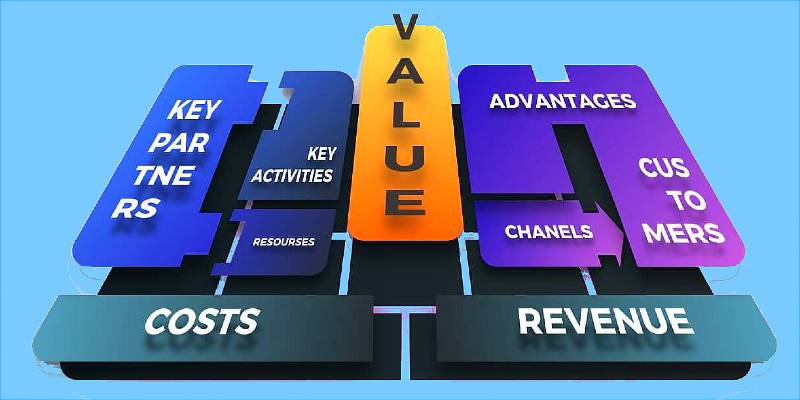
The Business Model Canvas is described in detail in relevant literature. Therefore, here is a summary of its basic structure. The model consists of nine areas , which you subdivide into the four perspectives of value proposition, customer, infrastructure and finance.
Customer Groups (Customer Segments)
The target group of the product or service, i.e. people who benefit greatly from the offer. The user does not have to be the customer.
- Who exactly are our customers?
- What do you do?
- What are your expectations?
Value Propositions
Problem of the customer that solves the product or service or the customer needs that it satisfies.
- What do we offer
- What problem are we solving?
- What needs do we cover?
Customer channels
The various channels of interaction with the customer along the customer journey , for example during the marketing, sales, service and delivery as well as after-sales phase of a product.
- How do we interact with the customer?
- How can a customer use our offer?
- How can we be reached?
Customer Relationships
The design of the customer relationship, particularly with regard to the acquisition, retention and expansion. This ranges from individual to automated, from intensive to sporadic.
- What do we want to be for the customer?
- How should a customer talk about us?
- How do we keep in touch?
Sources of income (revenue streams)
The revenue streams generated from the value proposition and the price model. Often money can be earned in various ways from a value proposition, for example one-off payments or subscriptions.
- What does a customer pay for?
- How much does the value offer cost once or recurring?
- What’s free?
Key Resources
The human, material and financial core resources such as IT systems, vehicle fleet or office buildings required to meet the value offers
- What do we have to be able to do for the value proposition?
- What do we need to own?
- What things do we have to add to value creation?
Key Activities
The main activities required for the operation of the business model.
- How do we have to work for the value proposition?
- What patterns do we have to think about?
- What intermediate results do we create?
Core partners (key partnerships)
The most important partnerships with non-competitors, suppliers, manufacturers and / or service providers, including complementary offers, required, for example, for the purpose of risk minimization and scaling.
- Who do we need input from for our value proposition?
- Who is also interested in our customers?
- Who can we get better with?
Cost Structure
Costs for resources, activities and partners, therefore fixed or variable expenses, without which the business model would not work.
- What are our expenses per value proposition?
- Where do we have to make one-off or recurring investments?
- How much does it cost to operate our business model?

In the nine areas you will locate the elements of a business model on separate maps. These are specific building blocks, such as specific customers or specific products and services. Using cards offers you several advantages. Cards can be moved, stacked or removed again. In addition, cards with their limited space force you to be brief.
You can also call the core resources, core activities, core partners and cost structures of a business model ‘backstage‘. Customers notice little to nothing of these elements. In contrast, the customer perceives the value proposition, the customer channels, the customer relationships and the sources of income. These four areas are also called the front stage.
A good business model also contains the authors and the date of the last change, the so-called meta information . The inventors Osterwalder and Pigneur also recommend that you note the recipient – i.e. the customer of the model – and the iteration loop on the canvas.
How to use a business model canvas template
You can create a Business Model Canvas alone or in a team . When it comes to the current situation – the current business model – it is worth doing the preliminary work in a quiet room. In plain language: You prepare a draft individually and then bring it to the team for refinement.
For the development of a target business model , however, it is advisable to work in a group right from the start. This is about the future, the target state. There should be agreement. For more speed, you can have the team design in parallel using the NABC method. Depending on the team size, you go through the following steps:
1. Define
Before working with the Business Model Canvas, define the purpose, use and level of detail of the business model.
– Who wants to do something with the canvas?
– Is it about the overview of the current actual model?
– Or should a target model be implemented with the help of the result?
In addition, determine beforehand which area of your business should be mapped in which accuracy on the canvas. Scope and depth of detail – both should be clear from the start.
2. Fill
When developing a new business idea or adding an existing model, go through all fields of the canvas one after the other and fill them in. If it is a simple model, it can often be done quickly with just a few components. More complex models take time.
3. Check
Then discuss the resulting Business Model Canvas with a handful of colleagues, preferably those who know the approach. Together you then work on the model, add elements, adapt existing ones or remove existing ones.
Finally, present the model to a large group. Together you then decide whether to go into the detailed analysis of the fields such as costs or core activities.
4. Use the canvas
Use the Business Model Canvas, for example to set up a new business model or to further develop an existing one. If there are new elements and thus new element relationships on the canvas, they usually have to be checked first. Use techniques like the test cards and check the assumptions.
5. Update
As the competition, customers and general conditions change, so does the business model. The Business Model Canvas is therefore not set in stone, but should be updated at regular intervals.
The development of a canvas is easy to explain. But that doesn’t automatically mean that the steps are always easy to take. It can happen that you get stuck in some areas. For example, customer channels or core activities are popular candidates where a lot of time can be spent. A joint run-through with colleagues helps to ultimately fill these areas as well.
Color coding
There are no set rules for color coding when using a business model canvas template. You can use colored lines, colored elements, sticky notes — or string ad glue if you wish! The crucial thing is the result makes the relationships easy to spot and understand.
Business canvas model examples
Our first business model canvas example is Google, and that canvas shows that its business model is multi-sided. This means that it brings together two distinct but related customers. Its customers are its search users and its advertisers. The platform is only of interest to advertisers because search users are also present. Conversely, search users would not be able to use the platform free of charge were it not for advertisers.

The canvas shows that:
- Google makes revenue from the advertiser customer segment.
- This money subsidizes a free offering to the other two customer segments: search users and content owners.
Google’s Key Resource is its search platform including google.com, Adsense (for content owners) and Adwords (for advertisers).
Key activities are managing the existing platform and infrastructure.
Key partners are the content owners and the OEMs (Original Equipment Manufacturers) of mobile handsets that carry (cost-free) Google’s Android operating system. In return, when users of these handsets search the internet they use the Google search engine by default, thus bring more users into the ecosystem and generating even more revenue.
Skype

The next example of business canvas model use is Skype, and shows that Skype has two key value propositions:
- The ability to make calls over the Internet, including video calls, for free.
- The ability to make calls to phones cheaply.
When examining the key partnerships, activities, and resources, you can see that Skype can support its business model of offering cheap and free calls because it doesn’t have to maintain its own telecoms network, considerably reducing its infrastructure needs.
Gillette
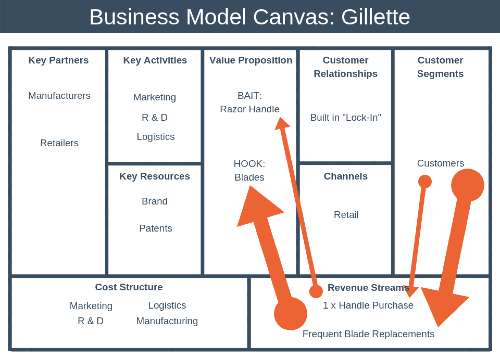
The third example for business model canvas use shows Gillette’s business model is a “Bait & Hook” one, with an affordable (or sometimes cost-free) initial offer that leads to future ongoing purchases. The bait is a cheap razor and the revenue-providing hook is the ongoing purchase of blade refills. Printers operate the same way with the printer box as the bait and the ongoing purchase of toner cartidges as the revenue hook.
Our fourth example is a different kind: the business model Uber canvas.

It allows you to distinguish between two types of key partners, those that are crucial and other partners. Uber’s most crucial partners are drivers, restaurants (Uber Eats), certain technology partners, cities and a fast growing ecosystem of commercial partnerships. In their pre-IPO business, the list of crucial partners rightly included investors. But these are now included in the wider key partners list.
The drivers are the supply side and help deliver the value proposition to the end customers (riders).
The list of crucial technology partners only includes those that help with unique technologies (or at least not widely available). At this stage of the company, this includes only partners for their new endeavours, such as autonomous vehicles (AV). Uber has also a lot of crucial IT technology but it is mostly proprietary (i.e. in-house build) which does not preclude that they are using common underlying technologies (see their tech stack) which – again – are not crucial partnerships.
Advantages and disadvantages
Advantages
- The Business Model Canvas is an easy-to-implement, intuitively understandable approach for recording and analyzing existing and defining new business models.
- A clear plus point is the focus on visualization , preferably with pen and paper or on the whiteboard. Gone are the days of the purely number-driven Excel view of companies.
- The catchy view of the business mechanics of a company opens the field for discussion and creativity.
- After just a few iterations, alone or in a team, it is clear which features characterize the intended business model and what its assumptions consist of.
Disadvantages
- You look in vain for competition and contextual factors such as laws, trends or industrial development in the canvas . The Business Model Canvas remains a model aimed at the customer and the inside of the company without taking the outside world into account. Use complementary approaches such as the PESTEL framework or the Five Foces model .
- Strategic aspects such as the corporate vision or business goals are also not in the scope of the model .
- A business model canvas only ever shows the business model at a discrete point in time . For each intermediate step towards a new business model, you have to build your own canvas or develop a roadmap.
- The canvas does not help you to develop a product or service for a business model. Use in-depth approaches such as the Strategy Canvas , Value Proposition Canvas or the pyramid of benefit elements .
- Personally, it is not always easy for me to differentiate between the fields of customer segments and customer channels . Concepts such as the customer journey combine both elements under the term ‘touchpoint’.
Practical tips
Tip 1 – start the model with the customer groups
Without a customer, no business model. Start your considerations with the customer and then go straight to the value proposition. When defining it, be sure to take the customer’s perspective. A customer does not pay for what the company can do, but for what benefits they get from your offer. You can deepen your considerations of the customer and the offer with the Value Proposition Canvas and the Strategy Canvas .
Tip 2 – start with the actual model
Before you dare to develop a new business model with the BMC, I recommend starting and practicing with the current business. Unlike a future business model, the actual business model is not defined, but derived. You and your colleagues model on the basis of the available facts. There is no discussion of hypotheses, scenarios and market trends .
Tip 3 – Differentiate between customer and partner
Customer ≠ partner. A customer pays with money, time, data, attention, etc. for the value proposition, a partner supports its provision. In some cases – such as with children’s toys – you have to differentiate between the user and the payer with the customer.
Tip 4 – implicitly consider competition
A point of criticism that is regularly raised about the Business Model Canvas is the lack of a competition area. Important here: The canvas is an internal view of the company. You can implicitly differentiate yourself from competitors via the value proposition, customer channels, etc. Alternatively, tools like the PESTEL framework or the Five Forces model can help .
Tip 5 – Differentiate between value proposition and sources of income
Value proposition ≠ sources of income. Avoid hiding beneficial elements in the income streams. The value proposition contains the customer benefits ( e.g. availability), the sources of income the way in which the customer pays.
Tip 6 – Differentiate between customer relationships and customer channels
Especially when you start over with a business idea, it is difficult not to put down acquisition projects in the area of customer relationships. Therefore, make a clear distinction between ongoing relationship maintenance and a one-off marketing campaign.
Tip 7 – use special variants of the canvas
Change Canvas, Mission Model Canvas, Digital Strategy Canvas, Lean Canvas, Strategy Canvas , Value Proposition Canvas , System Footprint – now there is a separate canvas for almost every domain. Before using the Business Model Canvas, check whether a more suitable frame of reference does not exist for your question.
Tip 8 – create links between elements
Every element on the canvas should have at least one relationship to another element. In other words: Avoid ‘orphan elements’ without reference to the business model elements. You should be able to tell a business model canvas like a story. For example, start with the customer and move from element to element in your designs.
Tip 9 – Force implementation
It shouldn’t stop with a well-filled canvas. No less important is the actual implementation of the new or optimized business model based on a roadmap and the projects derived from it. The Business Model Canvas serves as an orientation for the working mechanics of a company – the big picture.
Reading tip – If you would like to deepen the Business Model Canvas, we recommend the Business Model Generation by the two inventors by Alexander Osterwalder and Yves Pigneur.
Origin
The inventor of the concept is Alexander Osterwalder, who dealt with business models as part of his dissertation under doctoral supervisor Yves Pigneur. In 2010 he published the model in the book Business Model Generation , since which no strategy meeting has been without the framework. Today the trademark rights for the Business Model Canvas belong to Strategyzer , a company owned by Osterwalder and his colleague Alan Smith. As a poster and basic grid, the canvas is released for use and change as a Creative Commons (CC BY-SA) .
