




How do you tell the difference between a fake or genuine SD card? Our guide tells you the questions to ask, and how to test the card before it damages your device.
A microSD card with a terabyte of storage for only $10? Not only does this sound too good to be true, it usually is too. On online platforms such as Amazon, eBay or AliExpress, fraudsters offer memory cards and USB sticks with huge capacities at a bargain price. Most of the time, however, they are fakes that in practice do not even begin to deliver what the providers promise.
Best ways to tell a fake or genuine SD card
Reason enough to research the topic and look at the detection of counterfeit storage media.
Specifically, the experts advise customers who want to buy memory cards or USB sticks for smartphones, cameras or notebooks to turn on their common sense and not to fall for offers that are unrealistically cheap.
As a customer, you should ask yourself the following questions to tell the difference between a fake or genuine SD card:
- Does the advertised price correspond to the usual market level?
- Is the stated capacity realistic?
- Is the storage speed specified? Is it high enough?
- Is there a manufacturer website with clear product information?
- Is the seller based in the EU or elsewhere in the world?
- Does the seller generally make a serious impression?
If you can answer all of these questions satisfactorily with a storage offer, you should be on the safe side. Many fraudulent offers can be easily exposed by, for example, researching price comparison sites to find out how much a memory card or USB stick of the desired size usually costs. If the price is significantly lower, this does not speak for the seriousness of the source.
Unrealistically high capacities — such as microSD cards with more than one terabyte capacity — in combination with low prices indicate fraudulent offers. Suppliers from outside your country should be avoided in order not to experience any unpleasant surprises in the event of a complaint.
How to tell a fake Windows software product
The packaging
Often the SD card packaging is of noticeably poor quality. Don’t believe any seller’s claim that this is because it is a ‘factory reject’ or ‘factory second’ … they simply don’t exist. If you have a look at the comparison in our main image, you will see that the fake on the left has much poorer quality packaging than the genuine one on the right. The fake is also missing the hologram sticker on the genuine package. If the card comes in just a universal plastic container, it is definitely a fake.
The card itself
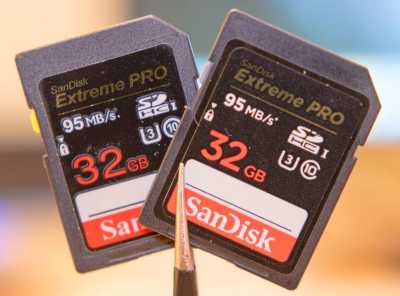
The production quality of fakes is poor, compared to the real thing. And often the details are incorrect. So if they don’t match with a genuine one you have, or can borrow, it is a fake. For example, in the comparison above, the lock tab should be grey/white, NOT yellow.
- The back should have a serial number engraved along with ‘Made In China’.
- The fonts should match the genuine card above (notice how the fake utilizes a different font for the size of the card).
- The speed of the card (in this case 95MB/s*) shouldn’t be missing the ‘*’.
- If you purchased a V30 card then the signifier should be present in the top right.
- The sticker on the front of the card should be aligned properly and not be offset or have any distinguishing defects such as being washed out of dull colors.
- The line near the bottom above ‘SanDisk’ should be thin and concise (fake is thick).
- The SanDisk logo at the bottom should have a square dot in the i, not rounded.
- The exterior case plastic should be a smooth, matte black finish, not a harsh speckled finish.
- Most counterfeits will be in the 128GB or 256GB sizing as scammers can get the largest profit off of these sizes due to the increased cost of the genuine cards.
- From a performance aspect, a counterfeit SD card will obviously underperform in speed and reliability as it is merely a cheap card with a more expensive card’s sticker (your camera might say the fake card is not compatible with your model).
- Some fakes may even have a 128GB or 256GB sticker on the outside but be only 32GB or 64GB on the inside.
Testing software detects counterfeiting
Anyone who buys a memory card on the Internet is also well advised to put it through its paces with test software before it is used in a smartphone or camera. For example, we recommend the free test programs H2testw for Microsoft Windows or F3 for macOS and Linux.
They subject storage media to an hour-long stress test, after which one knows the exact capacity, speed and storage quality. If the capacity or write speed do not match the manufacturer’s specifications or if there are bad sectors on a memory card immediately after purchase, you should exchange them.
Fake memory cards endanger your data!
In practice, counterfeit storage media often only offer a fraction of the promised capacity. Anyone who uses them in their devices risks destroying their data. If more is written on a memory card than there is space on it, this leads to data loss and, in the worst case, irretrievably destroys private photos and other memorabilia. If you want to avoid such nasty surprises, you should make backup copies of your data and store them in different locations.
