
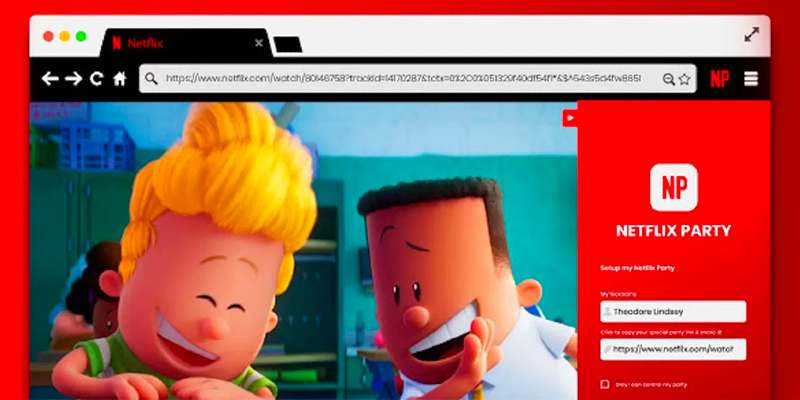



Our guide on how to Netflix Party outlines the easy steps to set up Netflix Party with your friends and family for a fun movie or TV viewing together.
Find more technology guides, tips and advice
You don’t have to be in the same room to enjoy a movie or series on Netflix together. If you are stuck at home and miss the collective film experience, you can use browser add-ons such as “Netflix Party” to watch films together with your partner, friends and family over the Internet.
With “Netflix Party” the film is streamed to several people simultaneously. If you stop the stream, it will also stop at your Netflix partner. You can also use the plug-in to open a chat in which you can talk about the film – almost as if you were actually sitting next to each other on the couch. We’ll show you exactly how this works below in our guide for how to Netflix Party.
If you have a long-distance relationship, friends and family live in distant places or if you are instructed to stay in your own four walls due to a situation – such as the current corona crisis – you do not have to do without watching films and television together.
Netflix has not yet released this feature for itself, but various browser add-on developers have already successfully closed the gap. In terms of functionality and popularity, the Chrome add-on “Netflix Party” is currently recommended. Here you can find out how you can use it to watch Netflix with your friends, which functions the add-on offers and more.
Some interesting genres are not visible on Netflix, but you can do a search and find them anyway.
What you need
So that you can see the same content synchronously, each party participant needs the following:
- Every participant of the “Netflix Party” needs their own Netflix account.
- Laptop, tablet or any other device that allows you to watch Netflix in the Chrome browser.
- Google Chrome must be installed as a browser
- The Chrome add-on “Netflix Party”:
If you do not currently have your own Netflix account, you can initially take out a trial Netflix subscription for 30 days.
How to Netflix Party: easy steps
- Open Netflix in a new tab and log in with your account details.
- Start the film or series that you want to watch together and pause the stream.
- The “Netflix Party” icon next to the address bar should be red, click on it.
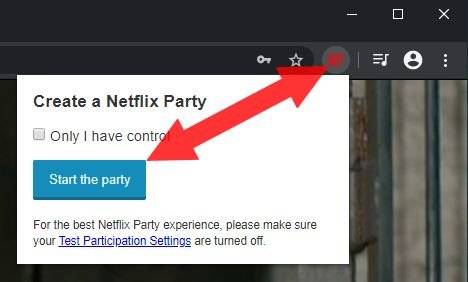
- Click on the “Start the Party” button .
(Optional) Check “Only I have control” if only you want to control the stream (pause, fast forward, etc.). - You will now see a link, click on “Copy URL” and send it to the participants of the party.
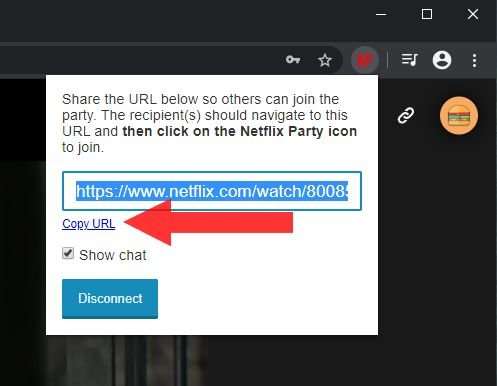
- The other participants should already have the “Netflix Party” add-on installed in Chrome and be logged into Netflix with their respective accounts.
- Participants now have to open the link in the Chrome browser to join the party.
- Start the film, relax.
If you don’t want to talk to the add-on using the chat, but rather talk to the participants on the phone, you can hide the chat at any time. To do this, simply click on the “Netflix Party” symbol and uncheck the box next to “Show Chat”.
The person who started the Netflix party can choose whether they keep control of the navigation themselves or share it with other users. In this way, the other users can pause, fast-forward and rewind the film. At least 10 participants can watch Netflix from different locations at the same time.
With the chat function you can comment on what you have seen in real time. Unfortunately, this does not include a camera function. If you still want to chat, you have to use third-party providers such as Skype, Google Hangouts, Discord and similar video call and video conference providers. It should be noted that all participants should better use headphones, otherwise an echo will occur.
If you want to watch the film on your television, you can connect your laptop or computer to common smart TVs using an HDMI cable and select the appropriate channel.
For a full video guide on how to Netflix Party, see below:
How to Netflix Party: The alternative – “Showgoers”
“Netflix Party” is not the only plug-in of its kind. With ” Showgoers ” you can also stream simultaneously with friends. This works in a similar way, here too you only have to share one URL. The only big difference: there is no chat.
Conclusion:
The plug-in party method is perfect for long-distance relationships or a series evening with friends who are either very lazy or very far away.
How do you watch films & series?
Thanks to streaming services, one is no longer dependent on the linear television program and the constant series repetitions of the TV stations. The long train journey can be shortened with a film on the smartphone. And thanks to the ever more affordable prices and better lamp life, more and more people can now fulfill their dream of home cinema with a projector.
